Ergonomics in office work: basic principles and their relation to musculoskeletal health
Basic principles
Ergonomics in office work adapts tasks, furniture and equipment to the individual in order to maintain an ergonomic work environment. neutral stance and limit the static loads on the spine, shoulders and upper limbs. Priority is given to the balanced distribution of forces, accessibility of tools and the postural variability to reduce mechanical overload factors associated with discomfort.
How to adjust the post
The following elements are usually considered when setting up the working environment:
- Neutral posturehead aligned, neck relaxed, shoulders without elevation, elbows close to 90°, and straight wrists.
- Lumbar support and seat heighthips level with or slightly above the knees; backrest that follows the lumbar curvature without straining.
- Screen at eye level and at comfortable distanceupper part at eye level and approximately one arm's length away, to avoid sustained cervical tilt.
- Keyboard and mouse next to each other and at the same levelThe forearm support allows forearm support and reduces wrist deviation and shoulder elevation.
- Feet and support surfaceFull support on the floor or on a stable footrest, avoiding pressure on the back of the thighs.
- Variability and short breaksAlternate tasks, change position and perform periodic micro-pauses to break immobility.
Relationship to musculoskeletal health
Fixed postures and repetitive movements are associated with increased likelihood of neck and back pain, shoulder discomfort, tendinopathies and symptoms in the forearms and hands. Ergonomic design can reduce muscle tension, joint compression and repetitive strain, which is often associated with reduced onset or intensity of discomfort in some individuals. The response is individual and multifactorial (physical condition, breaks, work demand and psychosocial factors), so post adjustments are understood as a load reduction measure and not as a single solution.
Ergonomic adjustment of the workstation: chair, desk, monitor, keyboard and mouse with benchmarks
Chair and table
- Seat heightAllow feet to rest fully on the floor; if this is not possible, use footrests. Knees at ~90-100° and thighs parallel to the floor.
- Seat depthLeave 2-3 fingers of slack between the edge of the seat and the back of the knee so as not to compress the popliteal fossa.
- Lumbar supportsupport at the level of the mid lumbar region (approx. L3-L4) with 90-110° backrest tilt for alternating between upright and slightly reclined posture.
- Armrestsheight that allows relaxed shoulders and elbows ~90-100° without elevating or separating them from the body; they should be close to the table without interfering.
- Height of the working surfaceThe height of the shoulder: at elbow level with relaxed shoulders (frequent reference: 70-75 cm for medium height), prioritising the adjustment to the individual anthropometry.
Monitor
- Line of sightTop edge of the screen at eye level or slightly below (≈2-5 cm). With progressive lenses, it may be useful to place it slightly lower to avoid cervical extension.
- Viewing distance50-70 cm (approx. one arm), increasing with larger screens; adjust font size to avoid overtaking the monitor.
- Inclination and orientation10-20° rear tilt; minimise reflections by positioning the screen perpendicular to light sources and adjusting brightness/contrast.
- Multi-monitor: primary monitor centred in front of the user; secondary monitors within ±30° of each other and at similar height. If both are used equally, centre the bezel between them.
Keyboard and mouse
- Keyboard: centred with respect to the body and monitor; flat or with a slight negative tilt to maintain neutral dolls. Height to allow for elbows ~90-100°. The wrist rest is used as a support during pauses, not during pressing.
- MouseLevel and as close as possible to the keyboard to avoid shoulder abduction; relaxed grip, prefer movements from shoulder/elbow rather than wrist only. Adjust the pointer sensitivity to reduce repeated deviations.
- Distributionif the numeric keypad is not used frequently, a compact form factor can bring the mouse closer and promote a more neutral shoulder alignment.
Neutral sitting and typing posture: alignment of spine, shoulders and wrists
Alignment of the spine when sitting
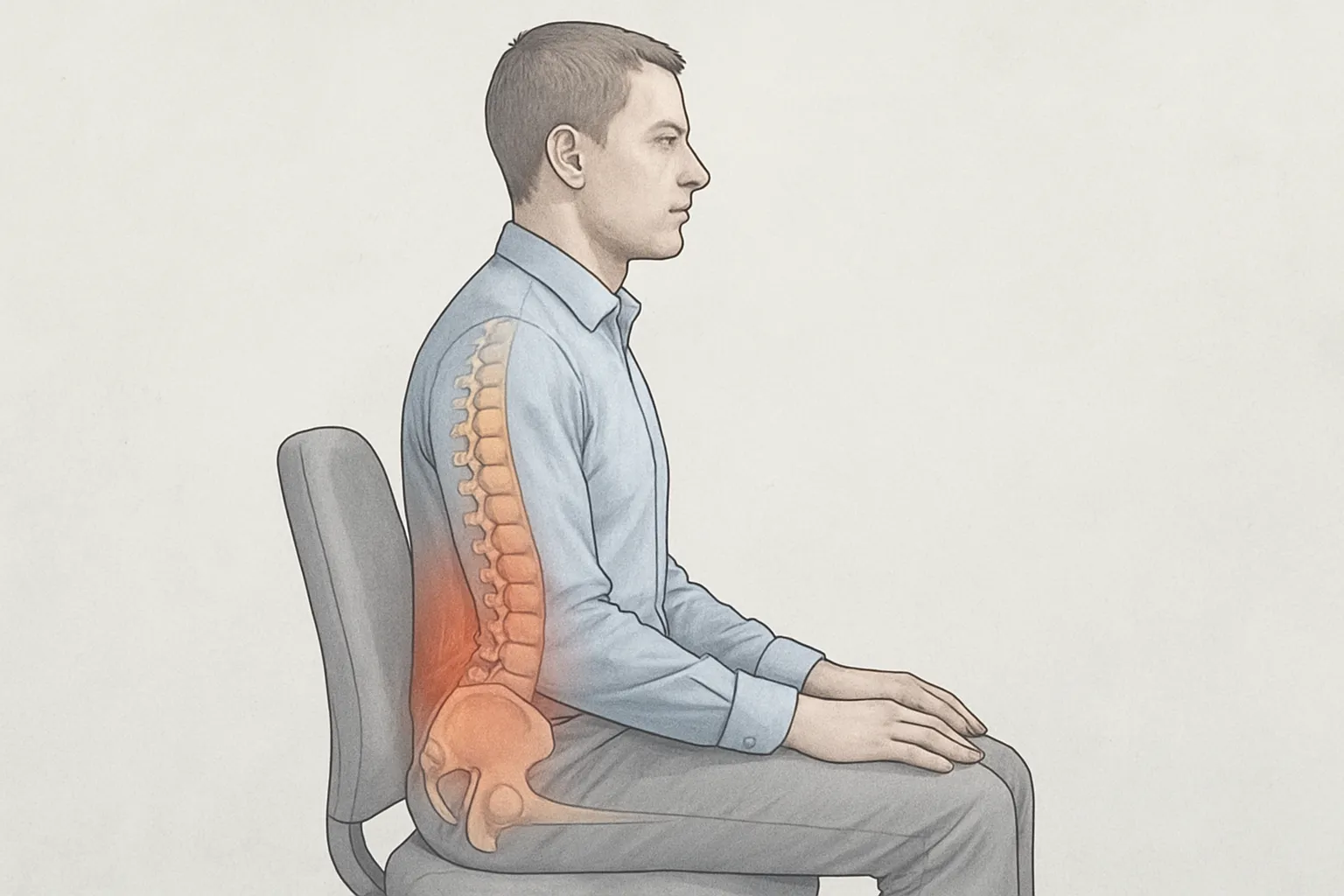
Maintain a neutral alignment involves sitting with the pelvis in an intermediate position (resting on the ischiae), preserving the pelvises in an intermediate position. physiological curves of the spine: mild lumbar lordosis, moderate thoracic kyphosis and aligned neck without anterior projection of the head. In the sagittal plane, ear, shoulder and hip should be approximately in the same vertical. The backrest can support the lumbar region without straining, with seat at a height that allows feet to be fully supported and knees at or slightly below hip level. Periodic alternating within this neutral range can help to spread loads and avoid sustained positions.
Shoulder and elbow position while typing
The shoulders are positioned relaxed, without sustained lifting, and the shoulders are scapulae stable without excessive protraction or retraction. Keeping elbows close to the trunk, with approximately 90-100° flexion, and forearms parallel to the floor facilitates efficient hand trajectory to the keyboard and mouse. Bringing devices close to the body and at elbow height reduces prolonged reaching; if armrests are used, intermittent and light support is preferable so as not to strain the neck and shoulder girdle.
Wrists when typing
The neutral wrist is characterised by minimal extension and no sustained radial or ulnar deviation, aiming for a continuous forearm-hand line. Adjusting the height and angle of the keyboard to match the level of the elbow helps to reduce unnecessary twisting; the wrist rest can be used for brief support between sequences, not during typing. Avoiding prolonged heel rest, using moderate pressing force and keeping the mouse close to the keyboard helps to reduce the mechanical demand on tendons and periarticular tissues.
Active breaks and micro-breaks in the office: guidelines for reducing stress and eyestrain
Frequency and indicative duration
For maintained display tasks, the following are considered reasonable micro-breaks 20-30 seconds every 10-20 minutes to interrupt eye fixation and postural maintenance, and active breaks 3-5 minutes every 60-90 minutes to mobilise segments and change visual stimuli. These figures are indicative and can be adjusted according to visual demand, workload and the appearance of signs such as dry eyes or cervical stiffness.
Content of micro-breaks and pauses
For the visual sphere, the pattern 20-20-20 (looking about 6 metres away for ~20 seconds after ~20 minutes of screen time) can help alleviate accommodative strain; supplement with conscious blinking (short series of 5-10 soft blinks) to promote wetting. Alternating near-far focus for 10-15 seconds and reducing excessive ambient brightness can also be helpful. In the musculoskeletal sphere, prioritise gentle, pain-free movements: shoulder raises and lowers, mild scapular retraction, comfortable cervical rotations and tilts, wrist and finger extension/flexion, and standing up to walk a few steps. Maintain a neutral stance when resuming the task (screen at eye level, back supported, forearms relaxed, feet stable).
Signs to adjust and precautions
Increasing the frequency or duration of breaks may be reasonable if transient blurred vision, gritty sensation, neck-shoulder pain or stiffness, or headache related to screen exposure occurs. Avoid manoeuvres that cause sharp pain, dizziness or persistent paresthesia; movements should be controlled and within a comfortable range. These guidelines are general and do not replace an individual clinical assessment for ongoing or new-onset symptoms.
Warning signs in the neck, back, shoulders or hands and when to consult a health professional
They are considered warning signs in the neck, back, shoulders or hands when they appear:
- Severe or progressive pain that does not improve with rest or interferes with sleep.
- Pain after trauma significant or fall, or visible deformity.
- Fever, chills, chills, general malaise, or local redness and warmth suggesting infection.
- Unintentional weight loss, history of cancer, immunosuppression, prolonged use of corticosteroids or osteoporosis.
Of particular concern are neurological or vascular signs:
- Progressive weakness in shoulder, arm or hand; clumsiness in fine dexterity or falling objects.
- Persistent numbness or tingling and pain radiating from the neck or back.
- Balance or gait disturbances, loss of “saddle” sensation” o changes in sphincter control.
- Cold, pale or bluish hand with severe pain or decreased pulse.
When to consult a health professional:
- Urgent assessmentpain in these areas with acute neurological deficit; fever with spinal pain or cervical stiffness; pain after an accident; signs of infection in the hand (puncture wound, swelling progressing rapidly); suspected fracture or dislocation; shoulder or arm pain associated with chest tightness, dyspnoea, cold sweats or nausea.
- Priority assessmentpain that persists for more than a few weeks, awakens at night or worsens; marked functional limitation; frequent recurrences; presence of risk factors such as previous cancer, bone fragility, or immunosuppression.